
Taxonomies, checklists and names
What a taxonomy, a checklist and a synonym pack each do, and how Bird Journal decides what to call a bird.
Updated
Bird Journal keeps three ideas apart: the species, the lists you record from, and what each bird is called. Knowing which is which makes most questions about names and counts easy to answer.
Taxonomies
A taxonomy defines the species: what counts as a species, the subspecies within it, its scientific and local names, and how species are grouped into families and orders. Every record you make is of a species in a taxonomy.
Taxonomies disagree with one another, which is why your counts follow one. Your Primary taxonomy, in Account ▸ Settings, is the one Bird Journal counts and names by. Birds of the World (AviList) is the usual choice. If you use more than one, a Secondary taxonomy can be chosen there too.
Taxonomies are revised as understanding improves, and Taxonomy updates covers how those reach your records.
Checklists and checklist packs
A checklist adds no species of its own. It picks out, from a taxonomy, the species of one place, so you choose from the birds that occur there rather than the whole world’s.
A checklist pack holds a checklist for each place it covers. A world pack gives every country its list, and others in the Library give each county or state its own. Each list is offered only where it applies, and you can make your own with Create a checklist.
Synonym packs
A synonym pack gives species other names without changing the species: British names (Robin for European Robin), names in another language, or short codes to record with. Install them from the Library’s Synonym Packs. Uninstalling one returns those birds to their taxonomy’s own names.
What a bird is called
Names are set in Account ▸ Settings, under Species Names. Shows as shows a bird the way your lists will.
- Preferred language — birds take their names in your language where the taxonomy has them, and English where it hasn’t. A synonym pack that names a bird comes ahead of the language.
- Use these names for — if you install names in another language, this chooses where they are used: Everywhere, or only for the birds of your country or continent, with English names elsewhere. It appears once such a pack is installed.
- Naming — Local Name Only, Local and Scientific Names, Scientific Name Only or Scientific and Local Names. With both, the second shows beside or beneath the first.
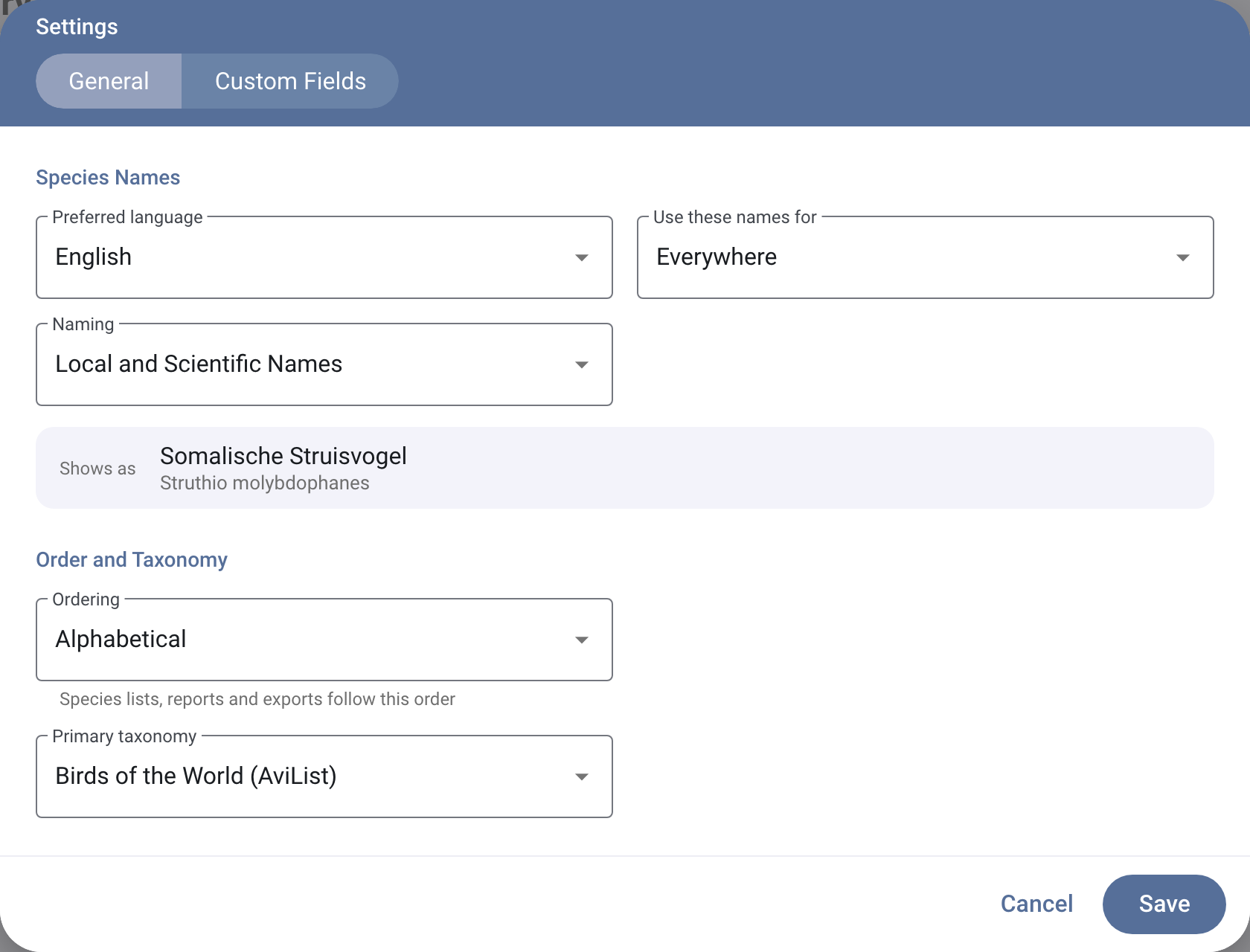
Your entries, species, reports and exports all follow these choices, so a bird has the same name everywhere.
Searching for a species
A species search finds the name shown first. With Local and Scientific Names you search by local name. To search by scientific name, choose Scientific Name Only or Scientific and Local Names, in Settings or in a list’s own options while recording.
A search also looks only within the list you are recording from. If a bird isn’t found, choose a wider list or the whole taxonomy.